Game overview
Drawquarium, explained without the guesswork
A cozy sandbox where your drawings become fish. It is made by a first-time developer, published by rokaplay, and scheduled for Windows PC on November 13, 2026. The demo is already out; the price is not.
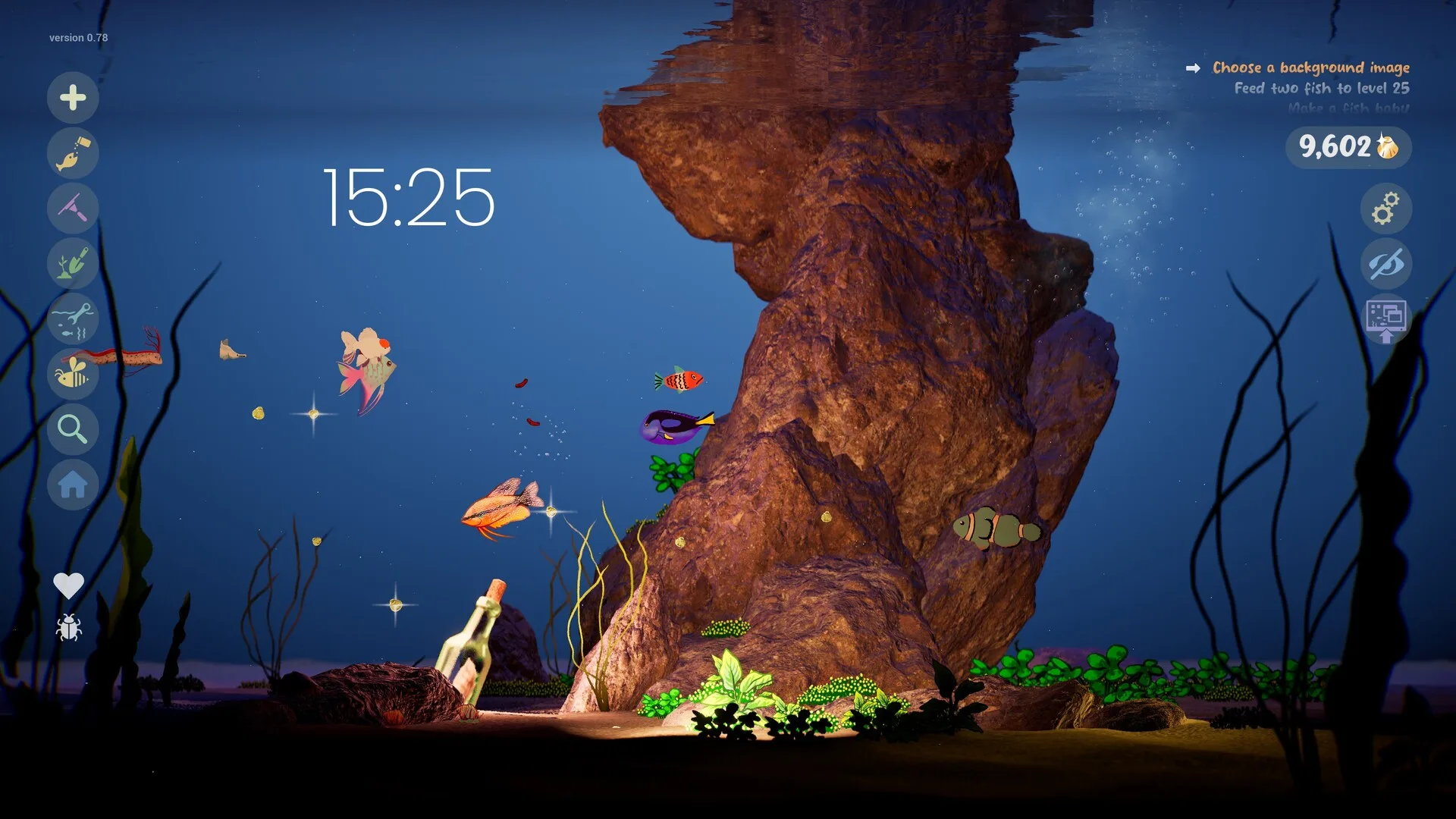
What Drawquarium is
Drawquarium is a single-player aquarium sandbox built around one loop: make something, place it in a tank, look after it. You can draw a fish from scratch, start from a body template, use eye and fin stamps, or import a PNG made elsewhere. Plants and food are drawn in the same editor. The tank is not a fixed diorama — rocks, driftwood, sand, water level, colours and lighting can be changed.
The developer, Kaleb Lechowski (byKaleb), describes it as his first game and says the original motivation was to bring his children’s drawings to life. Publisher rokaplay is handling the Steam release. The developer’s September 2026 update described systems that turn the drawing toy into something closer to a life-sim: breeding, growth, relationships, tank cleaning and a Golden Scale progression track.
It is also explicitly a desktop companion. Wallpaper Mode keeps the aquarium running behind your open windows, with feeding and play still available. A journal, checklist, timer, date clock and goal list live inside the same build. Whether that combination feels useful or distracting is a matter of taste; the feature set itself is confirmed.
The loop, in four parts
Draw or import fish
Paint a fish from scratch, start from a template, or import a PNG. The game also ships ready-made fish for players who would rather decorate than draw.
Draw plants, food and decorations
Plants are drawn in the editor and placed in the tank. Food is drawn too, and players can add rocks, driftwood and other scenery.
Feed, grow and breed
Fish start small, grow as they are fed, and can form friendships, rivalries and pair bonds. The developer’s September 2026 update lists breeding and baby fish.
Collect Golden Scales
Golden Scales are the progression currency. They unlock extra brushes, templates and customisation options.
Clean and maintain the tank
Leftover food and debris stay in the aquarium until they are removed with the aquarium vacuum. A neglected tank becomes visibly messy.
Customise the whole scene
Sand, rocks, driftwood, water level, colours and lighting can be changed. Caustics, bioluminescent creatures and a Disco Mode are also listed.
Use it as a desktop wallpaper
Wallpaper Mode keeps the aquarium on the Windows desktop behind other windows, with feeding and play still available.
Focus while it runs
A journal, checklist, timer and clock with the date sit inside the game. A goal list gives the sandbox a gentle direction.
What is officially confirmed
The list below comes from the Steam store description and the developer’s own announcements. It is not a summary of trailers or assumptions from similar games.
- Drawing: freehand canvas, templates, eye/fin/texture stamps, fill bucket, zoom, saved palettes, animation and size/behaviour options for fish.
- Importing: any PNG can be brought into the aquarium, including a child’s drawing.
- Plants and food: both are drawable; plants can be placed around the tank.
- Care: feeding, growth, age, metallic shimmer, possible golden fish, relationships, rivalry, breeding and baby fish.
- Maintenance: leftover food and debris remain until vacuumed.
- Progression: Golden Scales unlock brushes, templates, decorations and customisation.
- Customisation: sand, rocks, driftwood, water level, colours, lighting and caustics; bioluminescent creatures and plants; Disco Mode.
- Desktop: animated wallpaper mode with feeding and play; audio continues when switching modes.
- Focus: journal, checklist, timer, clock with date/weekday, ambient sound mixing and a goal/task list.
- Organisation: a global fish list with search, moving fish between aquariums, and editing a fish after it is finished.
Platform, languages and store details
Steam lists Windows only. There is no macOS, Linux, console or mobile release in the official record. The interface supports eight languages, but the store table does not show full audio or subtitles for any of them. Family Sharing is supported; online multiplayer is not.
Interface languages
Full audio and subtitles are not listed for these languages.
Steam features
- Single-player
- Family Sharing
- Mouse-only option listed
- Playable without timed input (accessibility category)
- No achievements listed at the time of checking
Who it is for — and who should wait
If the appeal of drawing a ridiculous fish and watching it swim around your desktop sounds like a good evening, the game is aimed directly at you. The demo is free, so the honest recommendation is to test the drawing feel before worrying about the full feature list. Drawing with a mouse works, but a pen tablet is supported and likely to be more comfortable for detailed work.
If you want a management game with tight optimization, failure states or a long campaign, the official material does not promise that. The developer calls it relaxing, cozy and something you visit for a mindful break. The goal list adds direction; it is not described as a story campaign.
What is still unknown
A wiki is only trustworthy if it admits the gaps. These are the questions we could not answer from official sources. They are not rumours and they are not placeholders for invented answers.
What does the full game cost?
Not confirmedNo price has been published. The Steam record marks the full game as paid rather than free, and the demo is free. Do not treat a guessed figure as a pre-order price.
Will demo aquariums carry into the full game?
Not confirmedWe found no official statement that confirms or denies save transfer. Treat the demo as a separate app and keep your own copies of any artwork you care about.
Can fish die?
Not confirmedThe store descriptions mention relationships turning sour and tanks getting dirty, but they do not describe death. We will not claim either way until it is confirmed in the released build.
Is there a population limit?
Not confirmedA limit may exist, but no official number has been published. Our tank planner therefore does not enforce a fake cap.
Does Wallpaper Mode work on multiple monitors?
Not confirmedNot confirmed. The store material shows a single desktop scene but does not describe multi-monitor behaviour, per-monitor audio or how the game handles different resolutions.
Are there Steam achievements or cloud saves?
Not confirmedNo achievements were listed in the store data we checked. Cloud save support is not listed either. The developer did describe local autosaves and backup saves.
How Steam describes it
Store tags are useful for finding similar games, not for proving mechanics. The current tags include cozy, relaxing, sandbox, desktop companion, life sim, creature collector, hand-drawn and family friendly.
One tag in particular is worth clarifying: “Design & Illustration” describes the drawing tool, not a professional art application. Another, “Desktop Companion”, describes Wallpaper Mode, not a separate app.
A note on similar names
Drawarium (drawarium.com) is a separate web/TV aquarium product with a nearly identical pitch: children draw fish, and the drawings appear in a family aquarium. We found no official statement connecting it to Drawquarium. If you arrived looking for a TV app with printable templates, this is the wrong site — our name-confusion explainer lays out the difference.
Where to go next
If you are ready to play, start with the demo guide. If you want to understand the release status first, the release-date page separates the confirmed date from the unknown unlock hour and price. If you are already drawing, the editor guide is the most useful next click.
Sources for this page
Accessed November 1, 2026Listed claims on this page were checked against the records below. If a detail is not in these records, it is labelled as unconfirmed rather than presented as fact.
- 01 Drawquarium on Steam — Valve / byKaleb / rokaplay
Store description, release date, languages, features, system requirements, tags and platform list.
- 02 Steam app details API for app 4045480 — Valve
Machine-readable copy of the store record, including platform flags (Windows only), screenshots and supported languages.
- 03 Drawquarium is Coming to Steam on November 13! — Kaleb Lechowski (Steam announcement)
Release date announcement published October 26, 2026, with the release-date trailer.
- 04 Drawquarium has changed a LOT since the demo in May — Kaleb Lechowski (Steam announcement)
September 18, 2026 list of added and improved systems since the first demo.
- 05 The Demo Is Out Now — Kaleb Lechowski (Steam announcement)
April 18, 2026 demo release announcement.
- 06 The Demo Is Delayed — Kaleb Lechowski (Steam announcement)
April 17, 2026 delay post; says the game had almost 35,000 wishlists at that time.
- 07
- 08 Drawquarium Steam Community hub — Steam Community
Player discussions. Used only to identify open questions, never as proof of a mechanic.
Read how we classify evidence in our editorial policy.